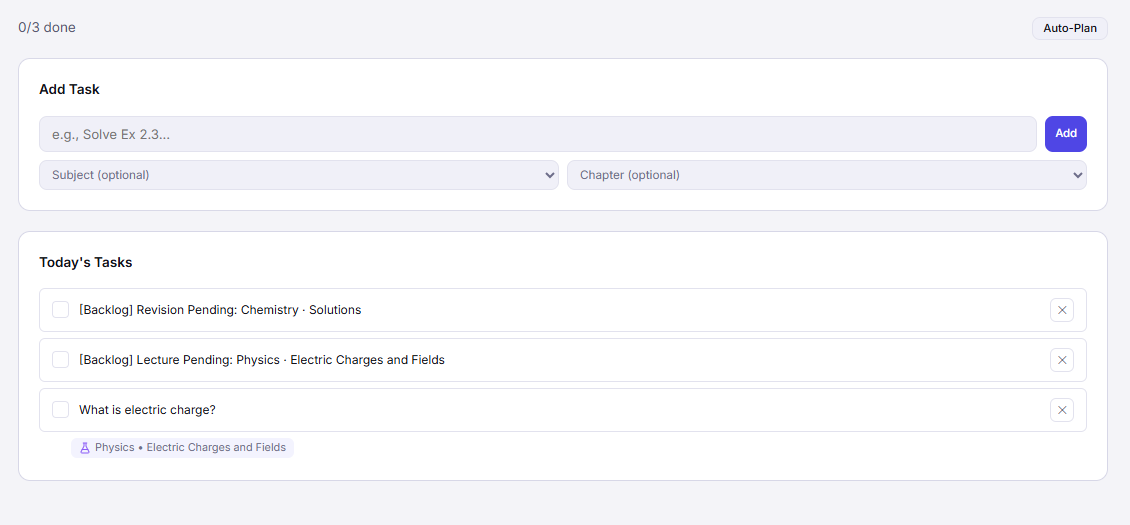
BoardOS turns your CBSE study plan into a clear, actionable daily task list — with subject tags, time estimates, and automatic rollover for anything you miss.
The Real Problem
Generic organisers make you do all the thinking. You still have to decide what to study, how long to spend, and which subject needs attention. BoardOS handles that logic for you.
Feature Breakdown
Every morning, BoardOS analyses your study plan, exam date, and backlog to auto-generate a prioritised daily task list — no manual planning needed.
Every task is tagged to a specific subject and chapter, so your progress updates are automatically reflected in your overall CBSE preparation dashboard.
Assign expected duration to each task. BoardOS shows you if today's plan fits in your available hours — before you even start studying.
Incomplete tasks don't vanish — they automatically move to your backlog and get rescheduled for tomorrow or your next available session.
Earn a daily completion percentage. Hit the daily target and you extend your study streak. Earn XP for every task checked off.
Thought of something mid-session? Quickly add ad-hoc tasks in seconds without breaking your flow. Link them to subjects later.
Daily Routine
Your personalised task list for the day is already generated and waiting for you.
Work through your tasks. Tick each off as you complete it. Your progress updates in real time.
Check your completion score, see what's rolling to tomorrow, and plan tomorrow's priorities in 2 minutes.
FAQ
Your daily tasks are already waiting for you inside BoardOS. Set up your CBSE plan in 5 minutes and get started today.