⏱️ Session Logger

You Think You Study 8 Hours a Day.
Your Data Says Otherwise.

Most students overestimate study time. StudyOS's session logger tracks every minute you spend studying — subject by subject, chapter by chapter — so you see the truth and focus.

100%
Accurate Time Data
1-tap
Session Start
All
Subjects Supported

One Tap to Start.
Everything Else is Automatic.

Select your subject, hit start, and StudyOS tracks everything. Your focus, your time, your progress — all saved automatically.

📘 Physics
Chapter 9 — Ray Optics & Optical Instruments
47:23
Session #3 today · Pomodoro Mode
2h 14m
Today (Physics)
11h 30m
This Week
87h
Total (Oct)

↑ This is what your StudyOS session view looks like in real time.

Everything You Need to Study Smarter, Not Just Longer

🎯

Subject-Level Time Tracking

See your total hours per subject — Physics, Chemistry, Maths, Biology — so you can identify which subjects are getting neglected before it's too late.

🍅

Built-in Pomodoro Timer

Use 25-minute focused study intervals with automatic 5-minute break reminders. Pomodoro technique helps improve retention and reduces mental fatigue.

📝

Session Notes & Focus Rating

After each session, log a quick note on what you covered and rate your focus from 1–5. Over time, you'll see patterns in your most productive hours.

📅

Full Session History

Browse your complete study history with filters by date, subject, or chapter. See exactly how your CBSE preparation has progressed over weeks and months.

Manual Backdated Logging

Studied without your phone? Log sessions retroactively. Enter the subject, duration, and notes to keep your history complete.

🔥

Streak Integration

Every logged session contributes to your study streak. Hit your daily target consistently and watch your streak number climb — motivation in data form.

Your Study Data, Beautifully Visualised

📊

Weekly Study Hours by Subject

[ Screenshot: Stacked bar chart — Physics, Chemistry, Maths, Biology hours per day across 7 days ]
📋

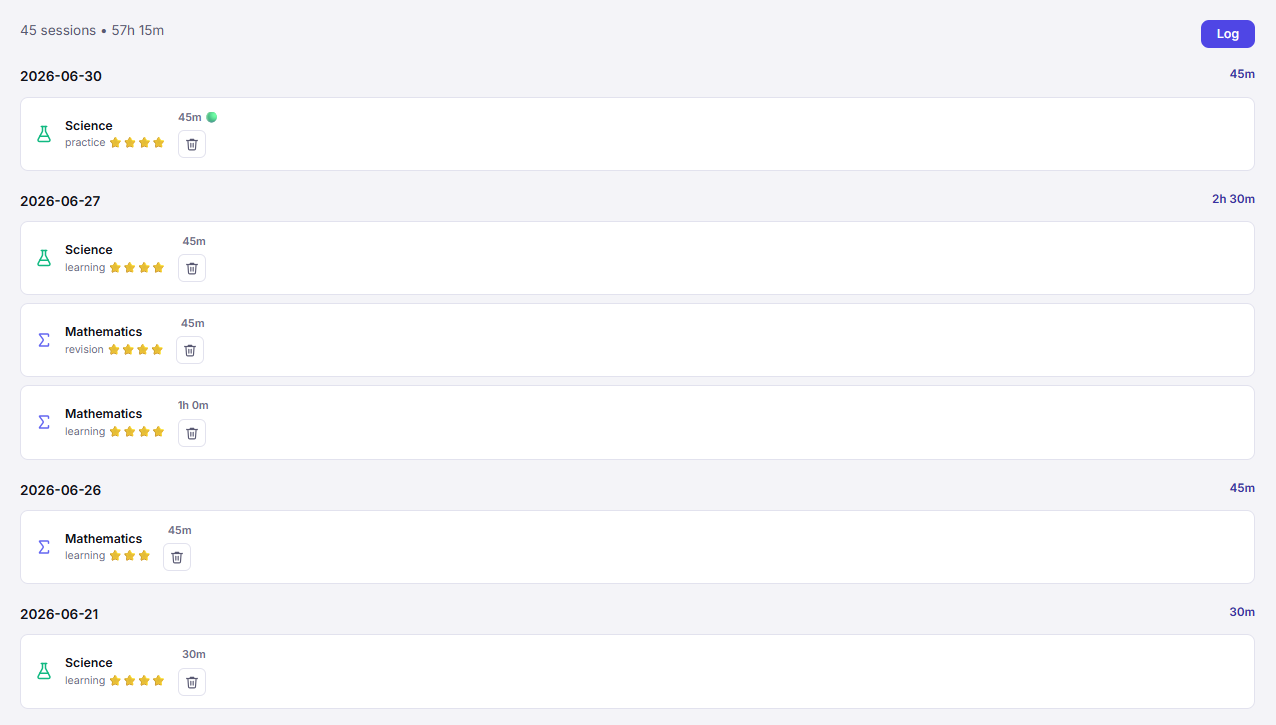
Session History Log

[ Screenshot: Chronological list of logged sessions with subject, chapter, duration, and focus rating ]

Log a Session in 4 Simple Steps

1

Select Subject & Chapter

Pick what you're studying from your subject list. Chapters are pre-loaded from your CBSE plan.

2

Hit Start

The timer runs. Study with focus — no distractions, just you and the chapter.

3

End & Rate

Stop the timer when done. Add a quick note and rate your focus.

4

Watch Your Stats Grow

Your session data adds to your weekly report, streak counter, and subject-hour dashboard.

Know Exactly How Much You're Actually Studying

Real data leads to real improvement. Start tracking your study sessions in StudyOS today — it's free.

Start Tracking Free → Open the App

Session Logger Questions

How does StudyOS track my study sessions?

You start a session from the StudyOS dashboard, select your subject and chapter, and start the built-in timer. When done, you log notes, rate your focus, and save. StudyOS stores every session in your history.

Can I log sessions after the fact without using the timer?

Yes. StudyOS allows manual session logging — you enter the subject, chapter, start time, end time, and any notes.

Does StudyOS show me how many hours I've studied per subject?

Yes. Your session history automatically aggregates into subject-wise study hour totals. You can view this by day, week, month, or across your full CBSE preparation period.

Can I use StudyOS like a Pomodoro timer?

Yes. StudyOS includes a Pomodoro-style session mode — 25-minute focused work intervals with 5-minute break reminders. Sessions are logged automatically after each cycle.

How does session logging help with CBSE exam preparation?

Most students overestimate how much they study. Session logging gives you hard data so you can see which subjects need more attention and rebalance your preparation accordingly.